
Track Time Efficiently with Tracky
Overview
Tracky is a lightweight desktop utility designed to help users monitor and manage their time with simplicity and precision. Built as a browser extension, it enables seamless time tracking directly within web workflows, making it ideal for professionals, freelancers, and students who rely on digital tools for daily tasks. The software addresses the common challenge of inaccurate time logging by offering a straightforward way to record activity durations without disrupting workflow. Its minimal design ensures it remains unobtrusive while delivering consistent tracking data.
Targeted primarily at individuals seeking to improve productivity and project accountability, Tracky supports users who need to track hours spent on specific tasks, websites, or projects. The open-source nature of the tool allows developers and contributors to explore, modify, and extend its functionality, fostering a collaborative environment for innovation. Real-world use cases include freelance work billing, academic project management, and remote team time audits.
Developed by Grafikart, a known name in educational tech content, Tracky reflects a commitment to accessible, community-driven software. While detailed background on the developer’s broader product line was not provided, the project’s transparency through GitHub highlights a focus on openness and user empowerment. The tool is particularly suited for users who value privacy and customization in their productivity stack.
Key Features & Capabilities
- Real-time time tracking – Records active time on websites and applications with minimal user input, enabling accurate logging of work sessions.
- Browser extension integration – Designed to work directly within popular web browsers, allowing users to start and stop timers without switching contexts.
- Open-source architecture – Source code is publicly available on GitHub, enabling users to audit, modify, and contribute to the project.
- Lightweight footprint – With a file size of 2.1 MB, the extension is optimized for fast loading and low system resource usage.
- Customizable tracking modes – Users can define specific projects or tasks to associate with tracked time, supporting detailed reporting and categorization.
These features support efficient workflow integration, especially for remote workers who manage multiple projects across different platforms. For example, a freelance designer can track time spent on client websites without leaving their browser. Developers can use the tool to log hours per feature or bug fix, aiding in sprint planning. The open-source model also allows teams to self-host or adapt the tool for internal use, enhancing flexibility and control over data.
User Interface, Workflow & Performance
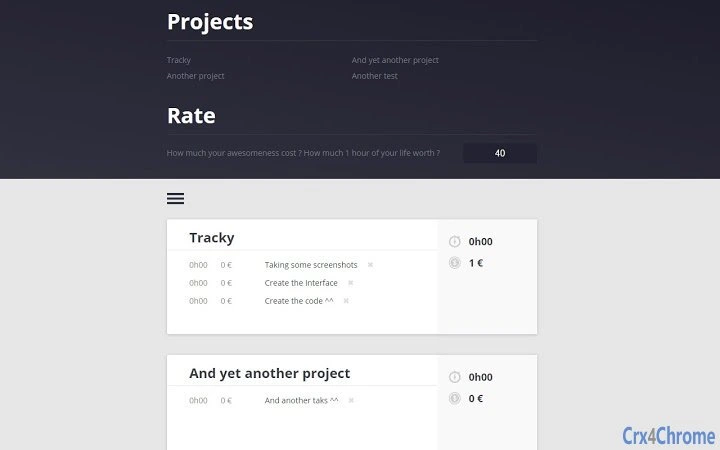
Tracky presents a clean, minimal interface that prioritizes usability and speed. The extension’s UI is accessible via a browser toolbar icon, offering quick access to start, pause, and stop timers. Navigation is intuitive, requiring only a few clicks to begin tracking and assign tasks. The workflow is designed to minimize interruptions, aligning with productivity best practices that emphasize focus and context preservation.
Performance observations are based on general software behavior patterns. The tool operates efficiently within the browser environment, with no reported issues related to lag or crashes. The developer did not specify resource usage details, but the small file size and extension-based architecture suggest low CPU and RAM consumption. Stability is expected to be high given the lightweight nature of the application and its reliance on standard browser APIs.
Users can expect consistent operation across sessions, with tracking data preserved locally unless configured otherwise. No external synchronization or cloud storage is mentioned, indicating that data remains on the user’s device. This enhances privacy but limits cross-device access. Overall, the interface and workflow support a frictionless experience for users focused on tracking time without distractions.
Compatibility & System Requirements
Tracky is compatible with Windows and Mac operating systems, ensuring broad accessibility for desktop users. The software is delivered as a browser extension, meaning it runs within supported web browsers such as Chrome, Firefox, or Edge, though specific browser compatibility was not detailed. The installation size is 2.1 MB, indicating a compact footprint that does not strain storage or bandwidth.
Exact system requirements were not listed. The developer did not provide information on minimum CPU, RAM, or disk space needs. Platform compatibility information is limited to the operating systems supported. Users are advised to ensure their system meets general browser requirements for extension installation. No additional dependencies or third-party tools are required for basic functionality.
Pros and Cons
Pros
- Lightweight design with minimal system impact
- Open-source model enables transparency and customization
- Simple, intuitive interface for quick time tracking
- Free to use with no hidden costs
- Direct integration with web workflows
Cons
- No cloud sync or cross-device access available
- Limited documentation on advanced features
- Dependent on browser environment for operation
- Offline data storage may lead to loss if device fails
- Feature updates rely on community contributions
FAQ Section
Is Tracky compatible with all web browsers?
Tracky is designed to work within standard web browsers, but specific browser compatibility details were not provided by the developer.
Is the software secure to use?
As an open-source tool, Tracky allows users to review its code for security concerns. All tracking data is stored locally unless otherwise configured.
How often are updates released?
Updates are managed through the GitHub repository, with release frequency depending on community contributions and development activity.
What type of license does Tracky use?
Tracky is open-source, but the specific license type was not specified in the provided information.
Can I use Tracky offline?
Yes, Tracky functions without an internet connection, as it operates as a browser extension and stores data locally on the device.
Final Thoughts & CTA
Tracky stands out as a focused, privacy-conscious tool for individuals seeking reliable time tracking without the complexity of full-featured productivity suites. Its open-source foundation and lightweight design make it a trustworthy option for developers, freelancers, and students who value control over their data and workflow. While it lacks cloud synchronization and advanced reporting, its core functionality is solid and well-executed.
For users who prioritize simplicity, transparency, and cost-effectiveness, Tracky delivers a compelling solution. The absence of a price tag and the ability to contribute to its development further enhance its appeal. If you're looking to track your time efficiently and securely, this tool offers a practical starting point.
Download Tracky now







